Array.prototype.filter()
filter() 메서드는 주어진 함수의 테스트를 통과하는(해당되는) 모든 요소를 모아 새로운 배열로 반환한다.
const words = ["딸기", "바나나", "토마토", "키위", 123]

const result = words.filter(word => word.length >= 3)
const result2 = words.filter(word => true)
const result3 = words.filter(word => false)

// numberOnly = function(item) {
//  return typeof item === 'number';
// }
// const number = words.filter(numberOnly) // numberOnly 함수 위에 쓰면 에러
const number = words.filter(word => typeof word === 'number') // 화살표 함수

console.log(result);
console.log(result2);
console.log(result3);
console.log(number);

// ["바나나", "토마토"]
// ['딸기', '바나나', '토마토', '키위', 123]
// []
// [123]
JS
arr.filter(callback(element[, index[, array]])[, thisArg])매개변수
callback
각 요소를 시험할 함수. true를 반환하면 요소를 유지하고, false를 반환하면 버린다.
element:: 처리할 현재 요소.
index: 처리할 현재 요소의 인덱스
array: filter를 호출한 배열
thisArg: callback을 실행할 때 this로 사용하는값
반환 값
테스트를 통과한 요소로 이루어진 새로운 배열. 어떤 요소도 테스트를 통과하지 못했으면 빈 배열을 반환합니다.
filter() 는 배열 내 각 요소에 대해 한 번 제공된 callback 함수를 호출해, callback이 true로 강제하는 값을 반환하는 모든 값이 있는 새로운 배열을 생성합니다. callback은 할당된 값이 있는 배열의 인덱스에 대해서만 호출됩니다;
삭제됐거나 값이 할당된 적이 없는 인덱스에 대해서는 호출되지 않습니다. callback 테스트를 통과하지 못한 배열 요소는 그냥 건너뛰며 새로운 배열에 포함되지 않습니다.
callback은 다음 세 인수와 함께 호출됩니다.
- 요소값
- 요소 인덱스
- 순회(traverse)되는 배열 객체
thisArg 매개변수가 filter에 제공된 경우, 호출될 때 그 값은 callback의 this 값으로 전달됩니다. 그 이외에, undefined값도 callback 의 this 값으로 쓰기 위해 전달됩니다. 결국 callback에 의해 관찰될 수 있는 this 값은 this를 결정하는 함수의 평소 규칙에 따라 결정됩니다.
filter() 는 호출되는 배열을 변화시키지(mutate)않습니다.
ex
function Student(name, age, hobby) {
  this.name = name;
  this.age = age;
  this.hobby = [];
  if (typeof hobby == "object") {
     this.hobby = hobby;
  }else {
    this.hobby.push(hobby);
  }
}

const students = [
   new Student("강수빈", 26, ["애니 감상", "달리기", "팔굽혀펴기"]),
   new Student("임태훈", 28, "영화감상"),
   new Student("양원철", 28, "골프"),
   new Student("이선균", 30, "맛집 탐방"),
   new Student("김호현", 26, ["국내 여행", "세계 투어", "자전거 타기"]),
   new Student("황현준", 28, "드라이브"),
   new Student("김보람", 30, "일기 쓰기"),
   new Student("이은재", 24, "독서"),
   new Student("정승교", 24, "자전거 타기"),
   new Student("박상현", 30, "농구"),
   new Student("전상민", 32, [분석, null]),
  ];

  console.log(
     students.filter((item) => {
     return item.hobby.indexOf("자전거 타기") > -1; //&& intem.age > 25;
     })
  );
  //Array(2)
  //0: Student {name: '김호현', age: 26, hobby: Array(3)}
  //1: Student {name: '정승교', age: 24, hobby: Array(1)}
find()
find 메서드는 해당 조건에 만족하는 첫 번째 요소의 값을 반환하며 만족하지 않으면 indefined를 반환합니다.
const array = [1, 2, 3, 4, 5, 6, 7, 8, 9, 10];
//callback(element, index, array)


array.find(v => v > 5);
// 6
find 메서드는 object가 담겨있는 배열에서도 유용하게 사용 가능합니다.
const array = [{name: 'red'}, {name: 'green'}, {name: 'yellow'}];

array.find(v => v.name === 'green');
//{name: 'green'};
findIndex
findIndex 메서드는 해당 조건에 만족하는 첫 번째 요소의 인덱스를 반환하며 만족하지 않으면 -1을 반환합니다.
const array = [1, 2, 3, 4, 5, 6, 7, 8, 9, 10];
//callback(element, index, array)

array.findIndex(v => v > 5);
// 5
array.findIndex(v => v > 11);
// -1
findIndex 메서드는 object가 담겨있는 배열에서도 유용하게 사용 가능합니다.
const array = [{name: 'red', {name: 'green'}, {name: 'yellow'}];

array.findIndex(v => v.name === 'green');
//1;

array.findIndex(v => v.name === 'blue');
// -1
ex
function Student(name, age, hobby) {
  this.name = name;
  this.age = age;
  this.hobby = [];
  if (typeof hobby == "object") {
     this.hobby = hobby;
  }else {
    this.hobby.push(hobby);
  }
}

const students = [
   new Student("강수빈", 26, ["애니 감상", "달리기", "팔굽혀펴기"]),
   new Student("임태훈", 28, "영화감상"),
   new Student("양원철", 28, "골프"),
   new Student("이선균", 30, "맛집 탐방"),
   new Student("김호현", 26, ["국내 여행", "세계 투어", "자전거 타기"]),
   new Student("황현준", 28, "드라이브"),
   new Student("김보람", 30, "일기 쓰기"),
   new Student("이은재", 24, "독서"),
   new Student("정승교", 24, "자전거 타기"),
   new Student("박상현", 30, "농구"),
   new Student("전상민", 32, [분석, null]),
  ];

  consol.log(
    students.find((item) => {
    return item.hobby.indexOf("자전거 타기") > -1;
    })
 );
 //age: 26 hobby:(3) ['국내 여행', '세계 투어', '자전거 타기'] name:"김호현"
※ [ 참고 ] 배열 메소드 find()와 filter() 차이는?
실행 결과의 차이는 find()는 하나의 값을 반환하고 filter()는 일치하는 결과 모두를 배열로 반환합니다. map()과 reduce() 역시 map()은 배열을 reduce()는 하나의 결과를 반환하므로 약간 비슷합니다. 쉽게 말해서 find()는 제일 먼저 일치하는 조건의 값 하나만 반환하는 것이 filter()와 차이점입니다. 마치 하나의 값만 찾는 쿼리문 findOne() 메소드를 떠올리게 합니다. 이 둘의 차이점을 알면 상황에 따라 더 적합한 함수를 적용할 수 있겠습니다.
forEach()
foreach()는 배열에 적용되는 함수로 배열 각 요소에 callback함수를 적용할 수 있도록 하는 메서드입니다.
ex
let array = [1, 2, 3]
array.forEach(x =>{
  console.log(x)
})
// 1 2 3
array 배열에 foreach를 사용하면 각요소를 x에 넣고 함수를 실행시킵니다. 1,2,3이 순서대로 출력됩니다.
foreach()는 callback함수를 실행할 때 요소, 인데스, 전체 배욜 값을 전달할 수 있습니다.
array.forEach((x, i, t) => {
  consol.log(x, i, t)
};)

// 1 0 (3) [1, 2, 3]
// 2 1 (3) [1, 2, 3]
// 3 2 (3) [1, 2, 3]
x는 요소값, i는 인덱스값, t는 전체 배열입니다.
필요한 것을 적절하게 가져다 쓸 수 있습니다.
ex
function Student(name, age, hobby) {
  this.name = name;
  this.age = age;
  this.hobby = [];
  if (typeof hobby == "object") {
     this.hobby = hobby;
  }else {
    this.hobby.push(hobby);
  }
}

const students = [
   new Student("강수빈", 26, ["애니 감상", "달리기", "팔굽혀펴기"]),
   new Student("임태훈", 28, "영화감상"),
   new Student("양원철", 28, "골프"),
   new Student("이선균", 30, "맛집 탐방"),
   new Student("김호현", 26, ["국내 여행", "세계 투어", "자전거 타기"]),
   new Student("황현준", 28, "드라이브"),
   new Student("김보람", 30, "일기 쓰기"),
   new Student("이은재", 24, "독서"),
   new Student("정승교", 24, "자전거 타기"),
   new Student("박상현", 30, "농구"),
   new Student("전상민", 32, [분석, null]),
  ];

  students.forEach((item) => {
    console.log(item);
  });

  function forEach(tempFunc) {
     for (let i = 0; i < students.length; ++i){
        tempFunc(students[i]);
      }
    }
  forEach((item) => {
  console.log(item);
  });
  // 둘다 모든 학생의 age hobby name이 출력 된다
concat 함수
concat 은 두 개의 문자열을 하나의 문자열로 만들어주는 역활을 하는 함수이며,
입력값을 문자열 대신 배열을 사용하면 두 개의 배열을 하나의 배열로 만들어주는 역활도 하는 함수입니다.
"[문자열]".concat("[문자열]"); //문자열 합치기

 [배열명].concat([배열명]); //배열 합치기
ex).문자열
let str1 = "con";

let str2 = "cat";

document.write("str1.concat(str2) : " + str1.concat(str2) + "<br>");

// str1.concat(str2) : concat
ex). 배열
arr1 = ["아우디", "BMW", 1]
arr2 = ["홍길동", "최철수", 5]

const result = arr1.concat(arr2);
console.log(result);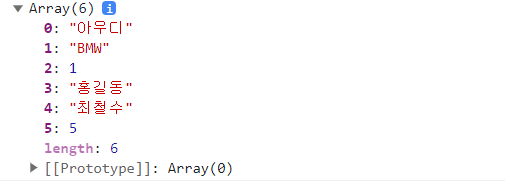
'블록체인 sw개발자' 카테고리의 다른 글
| [JS] Map 함수 (0) | 2023.07.07 |
|---|---|
| [JS] 문자열 string (0) | 2023.07.07 |
| [JS] object(객체) (0) | 2023.07.06 |
| [JS] scope (0) | 2023.07.05 |
| [JS] for 문 (0) | 2023.07.04 |
